When it comes to optimizing your gaming experience, one factor often overlooked is the importance of cable management systems in your setup. Imagine a clutter of wires hindering your focus during intense gameplay or risking damage to your equipment due to poor ventilation caused by tangled cords. By addressing cable organization strategically, you not only improve the aesthetics of your gaming desk but also enhance your overall gaming performance. So, how can a well-thought-out cable management system elevate your gaming setup beyond just aesthetics?
Importance of Cable Management in Gaming Desks
Proper cable management in gaming desks is crucial for maintaining a clean and organized setup. When cables are left tangled and messy, not only does it look unsightly, but it can also affect your gaming experience. Picture this: you’re in the middle of an intense gaming session, and suddenly your mouse or keyboard stops working because the cable got caught or disconnected due to poor cable management. It’s frustrating, right? By organizing and managing your cables efficiently, you can prevent these annoying interruptions and focus on enjoying your games without any distractions.
Moreover, neat cable management doesn’t just enhance the visual appeal of your gaming setup; it also plays a significant role in maintaining the longevity of your devices. When cables are tangled or bent at odd angles, they’re more prone to wear and tear, potentially shortening their lifespan. By keeping your cables organized and neatly arranged, you can ensure that your gaming peripherals and devices remain in top condition for longer, saving you money in the long run.
Benefits of Organized Cable Systems
Maintaining organized cable systems in your gaming desk setup offers numerous advantages beyond just aesthetics and convenience. One key benefit is improved airflow and ventilation around your gaming equipment. With cables neatly managed and tucked away, there’s less clutter obstructing airflow, which can help prevent overheating issues and prolong the lifespan of your devices. Additionally, organized cables make it easier to locate and access specific cords when needed, reducing the time spent searching for the right connection.
Another advantage of having an organized cable system is the reduced risk of accidents or damage. Tangled cables can be tripping hazards and may lead to accidental spills or equipment being pulled off the desk. By keeping cables organized and secured, you create a safer gaming environment for yourself and others who may use the space. Moreover, a tidy cable setup can contribute to a more focused and enjoyable gaming experience, as you can concentrate on gameplay without distractions or frustrations caused by messy cables.
Choosing the Right Cable Management Solutions
When considering how to best manage cables in your gaming desk setup, it’s essential to select the most suitable cable management solutions. The right solutions can make a significant difference in keeping your gaming area organized and free of tangled wires.
One popular option is cable sleeves, which are flexible tubes that encase multiple cords, providing a neat and streamlined look. Cable clips are also handy for securing cables to the underside of your desk or along its edges, preventing them from dangling or getting in the way.
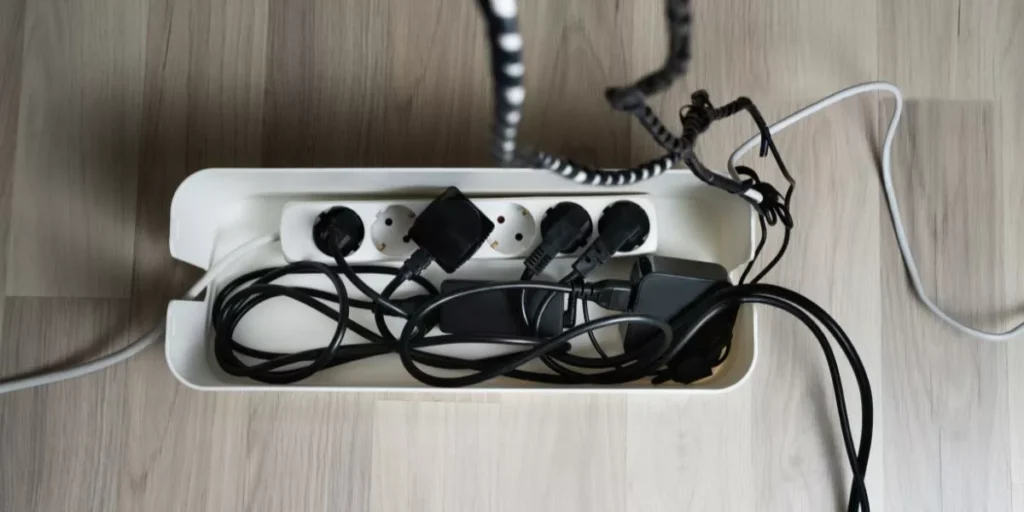
Additionally, cable trays can be mounted underneath your desk to hold power strips and keep cables off the floor, further reducing clutter. Velcro cable ties are perfect for grouping and securing cords together, making them easier to manage and identify.
Lastly, cable raceways are ideal for hiding cables along walls or baseboards, maintaining a clean and professional appearance in your gaming space. Choose the right cable management solutions that suit your needs and preferences to create a tidy and efficient gaming setup.
Tips for Maintaining a Tidy Setup
To keep your gaming desk organized, regularly tidy up cables and remove any unnecessary clutter. Start by untangling and organizing your cables. Use cable ties or organizers to group cords together and prevent them from tangling. Labeling cables can also help you easily identify each one, reducing confusion and making it simpler to troubleshoot or make adjustments. Consider using cable sleeves or routing channels to conceal and streamline cables, creating a cleaner and more visually appealing setup.
When it comes to clutter, be ruthless in decluttering your gaming desk. Remove items you no longer use or need, such as old peripherals, papers, or knick-knacks that serve no purpose. Keep only the essentials within arm’s reach to maximize desk space and minimize distractions. Regularly dust and wipe down your desk to maintain a clean and inviting gaming area. By staying proactive and consistent in your efforts to keep your setup tidy, you can create a more enjoyable gaming experience and prolong the lifespan of your equipment.
Trending Products